
Contents
Why a collapsing toolbar library
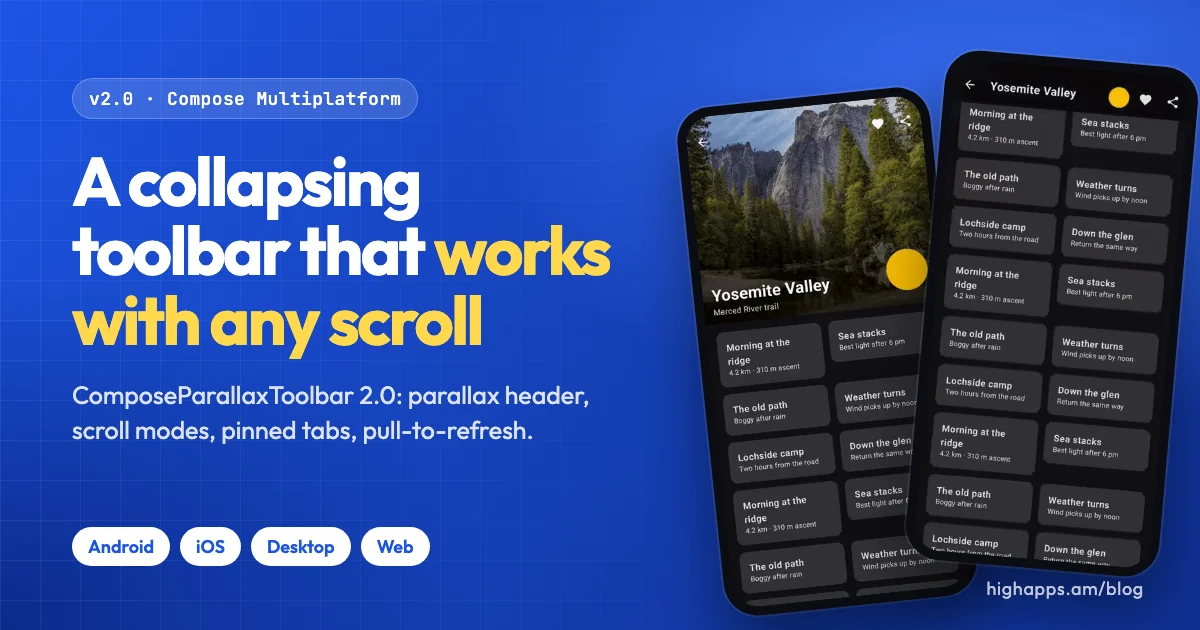
Almost every app has a screen with a big picture on top: an album, a place, a profile, a product. Scroll down and the picture should slide away slower than the content, the title should shrink into a toolbar, and the back and share buttons should stay where your thumb expects them. On Android Views, CoordinatorLayout and CollapsingToolbarLayout did this for us. In Compose, it's something you build yourself.
Material 3's LargeTopAppBar collapses a title, but it has no header image and no parallax, and it stops at the toolbar. We kept rewriting the same header for HighApps screens, so we turned it into a library. Version 1.x worked for Android and iOS. Version 2.0, out now, is a rewrite: it runs on all four Compose Multiplatform targets and works with any scrollable you put under it.
In short
- One composable,
ComposeParallaxToolbarLayout, with slots for header, title, actions, body, tabs and an overlay. - Any body:
Column,LazyColumn, grids, staggered grids, pagers. - Three scroll modes, snapping, overscroll stretch with pull-to-refresh, and per-element parallax, fade, scale and pin.
- Android, iOS, desktop and web. No Material dependency.
Try it in the browser
The sample app is a playground shared by all four platforms, and its web build runs right on this page. Scroll inside the phone, change the scroll mode in the bottom bar, and open the gear for presets and every setting.
The real library, running in your browser
The same Kotlin code as the Android and iOS samples, compiled to WebAssembly. It loads only when you press play, so this page stays light.

Drag or use the mouse wheel inside the phone
Getting started
Add the dependency to the source set that holds your screens: commonMain in a Compose Multiplatform project, or the app module in an Android-only project.
dependencies {
    implementation("am.highapps.parallaxtoolbar:compose-parallax-toolbar-kmp:2.0.1")
}
A full screen fits in one call. Each slot receives collapsed, so the title can switch style as it lands in the toolbar:
@Composable
fun AlbumScreen(album: Album, onBack: () -> Unit, onShare: () -> Unit) {
    ComposeParallaxToolbarLayout(
        titleContent = { collapsed ->
            Text(
                album.title,
                style = if (collapsed) MaterialTheme.typography.titleMedium
                        else MaterialTheme.typography.headlineMedium
            )
        },
        subtitleContent = { Text(album.artist) },
        headerContent = {
            Image(album.cover, null, Modifier.fillMaxSize(), contentScale = ContentScale.Crop)
        },
        navigationIcon = { IconButton(onClick = onBack) { Icon(Icons.AutoMirrored.Filled.ArrowBack, null) } },
        actions = { IconButton(onClick = onShare) { Icon(Icons.Default.Share, null) } },
        content = ParallaxContent.Lazy(
            content = { collapsed -> items(album.tracks) { TrackRow(it) } },
            config = ParallaxToolbarDefaults.lazyColumnConfig(contentPadding = PaddingValues(16.dp))
        )
    )
}
The Material calls above are the app's choice. The library itself depends only on Compose UI and Foundation, so it fits any design system.
On iOS, desktop and web you use it from your shared Kotlin module. Nothing is imported on the Swift or JavaScript side. The platform guide covers edge-to-edge on Android, hosting on iOS, and the desktop and web setup.
What's new in 2.0
- Any scrollable bodyColumns, lazy lists, grids, staggered grids and pagers. Dragging the header itself collapses it too.
- Scroll modes and snapExit until collapsed, enter always, or enter always collapsed. Snap to the nearest resting position on release.
- Per-element effectsGive any header element its own parallax, fade or scale, pin a chip row, or glide an avatar into the toolbar.
- Tabs and pull-to-refreshA bottom slot for tabs or search, and an overscroll stretch with a refresh callback.
- Hoisted stateRead the collapse fraction, call
collapse()andexpand(). Survives rotation and process death. - Accessibility and RTLState announcements, expand and collapse actions, a heading for the title, and right-to-left layouts.
Bring your own scrollable
In 1.x the body had to be one of two built-in content types. 2.0 drives the header through nested scrolling, so anything that scrolls vertically can sit under it. Use ParallaxContent.Regular for a column, ParallaxContent.Lazy for a list, or ParallaxContent.Custom for everything else:
content = ParallaxContent.Custom {
    LazyVerticalGrid(GridCells.Fixed(2), Modifier.fillMaxSize()) {
        items(photos) { PhotoCell(it) }
    }
}
Three scroll modes
Scrolling up always collapses the header first. The mode decides what happens on the way back down: expand only at the top of the list, expand right away from anywhere, or also slide the toolbar out of the way and bring it back first.
ExitUntilCollapsed default
EnterAlwaysEnterAlwaysCollapsed headerConfig = ParallaxToolbarDefaults.headerConfig(
scrollMode = ScrollMode.EnterAlways,
snapOnRelease = true
)Snap and a centered title
With snapOnRelease, a half-collapsed header settles to the nearest resting position when you lift your finger, the way system toolbars do. The title can also land centered and smaller in the toolbar with collapsedAlignment and collapsedScale.
snapOnReleasecollapsedAlignment and collapsedScaleTabs, pull-to-refresh and elements that travel
bottomContent pins tabs or a search field under the toolbar. stretchEnabled lets a pull past the top stretch the header and, past a threshold, calls onStretchTrigger, which is all you need for pull-to-refresh. overlayContent sits above everything, so an avatar can glide from the header into the toolbar with moveBetween.
bottomContent and stretchEnabledoverlayContent with moveBetweenbottomContent = { TabRow(/* ... */) },
headerConfig = ParallaxToolbarDefaults.headerConfig(stretchEnabled = true),
onStretchTrigger = { viewModel.refresh() },
overlayContent = {
Avatar(
Modifier.size(72.dp).moveBetween(
expanded = Alignment.BottomEnd,
collapsed = Alignment.CenterEnd,
collapsedScale = 0.5f
)
)
}State you can hold and drive
The state is hoisted like LazyListState. Read the collapse fraction anywhere, or move the header from code. The fraction is saved across configuration changes and process death.
val state = rememberParallaxToolbarState()
val scope = rememberCoroutineScope()

ComposeParallaxToolbarLayout(/* ... */, state = state)

Text("${(state.collapseFraction * 100).toInt()} %")
Button(onClick = { scope.launch { state.collapse() } }) { Text("Collapse") }
How it works
A few decisions shaped the rewrite. They matter if you care about how it behaves on a slow phone.
The header stores how far it has collapsed, not where it is in pixels. Everything else follows from that.
- One layout pass. Header, body, toolbar, bottom and overlay slots are measured in a single custom
Layout. 1.x positioned the toolbar with callbacks, which caused a one-frame jump on first display and on rotation. That jump is gone. - Nested scrolling drives the header. The header's position is a
ScrollableStatefed by a nested scroll connection on the layout and ascrollableon the header. The body keeps its own scroll state, so lists, grids and pagers need no special handling. - Fractions are the source of truth. The state stores the collapse as a value from 0 to 1. Pixel offsets are derived once the layout knows its heights, so rotation, resizing a desktop window, or restoring after process death keeps the header in the same place.
- Scrolling doesn't recompose. Slots read the scroll state inside graphics layer blocks, so a fling only redraws, and your header and title content doesn't recompose on every frame.
- Fail fast on bad config. Invalid values throw at construction with a message that names the field and the valid range, instead of rendering something odd.
Upgrading from 1.x
Most screens need one edit, and many need none. The main ones:
| 1.x | 2.0 |
|---|---|
scrollState parameter | state = rememberParallaxToolbarState(scrollState = ...) |
| Material 3 dependency | Removed. Bring your own design system. |
iconSize, iconSpacing | Removed, since nothing read them. Size icons inside the slots. |
| Config data classes | Plain classes with copy, equals and hashCode |
iosX64 target | Removed, because Compose Multiplatform no longer publishes it |
The migration guide lists every change and the small behavior differences you may notice, such as collapse() now moving only the header and leaving the body's scroll position alone.
What's next
2.0 is about the foundation: a layout that works with any scroll, on every platform, with an API that can grow without breaking you. The public API is checked on every pull request, and deprecated calls keep working for at least one minor release with a suggested replacement.
If you use it, we'd love to hear what you build and what's missing. Open an issue for bugs or ideas. If you work with an AI coding assistant, point it at llms.txt, which has the current API and the 1.x habits to avoid.
Give it a try
A star on GitHub helps other developers find the library.
Written by
HighAppsWe make Android and iOS tools like Tint Meter and Light Meter, arcade games, and open-source Kotlin Multiplatform libraries. Visit highapps.am